
Area Pages
LilSEO Documention
A detailed guide with step-by-step instructions on how to use our Local SEO Plugin.
Simple, straight-forward and to the point.
LilSEO Plugin: Area Pages
Our Local SEO Plugin lets you set Areas that are used within the URL Structures which will appear before the Landing Page in the URL.
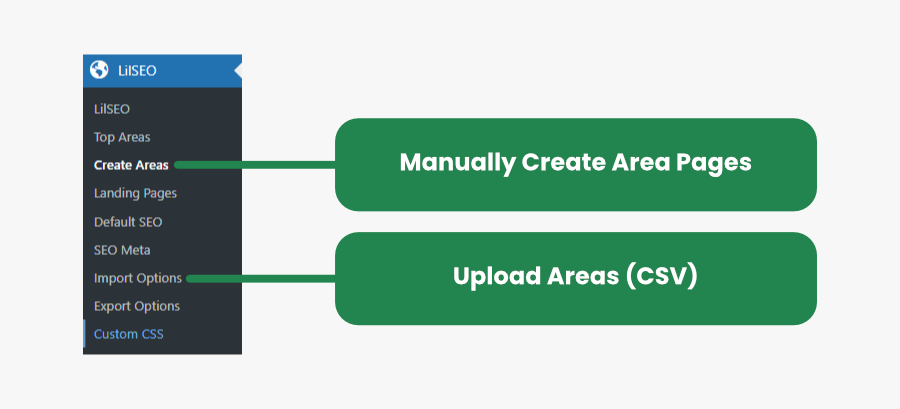
With your LilSEO plugin installed, head over to the Create Areas section and either create each area manually or you can upload a list of Areas in bulk using the Import Options tool which is explained in more detail here: Import / Export Options.
When manually creating or uploading a CSV, ensure you fill in all of the required fields which will be used for Shortcodes, Templates and will be used to internally link Siblings and Cousins which is explained more on the Shortcodes page.
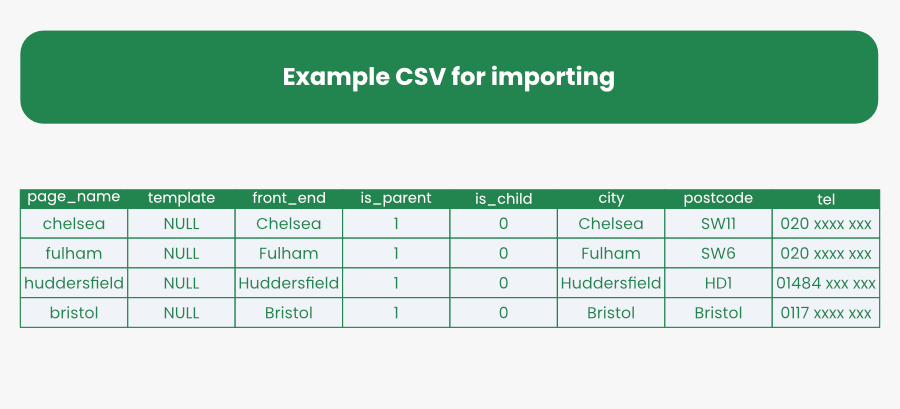
As you can see from the example above, by creating Area Pages – the values associated with it in the same row will then be used to display dynamic content throughout the template files.
Next, you then need to head over to Create Landing Pages to start displaying localised content.