
Meta Data
LilSEO Documention
A detailed guide with step-by-step instructions on how to use our Local SEO Plugin.
Simple, straight-forward and to the point.
LilSEO Plugin: Meta Data
Our Local SEO Plugin adapts the Meta Data that you input in the SEO META section of the plugin to display those values dynamically within the Template.
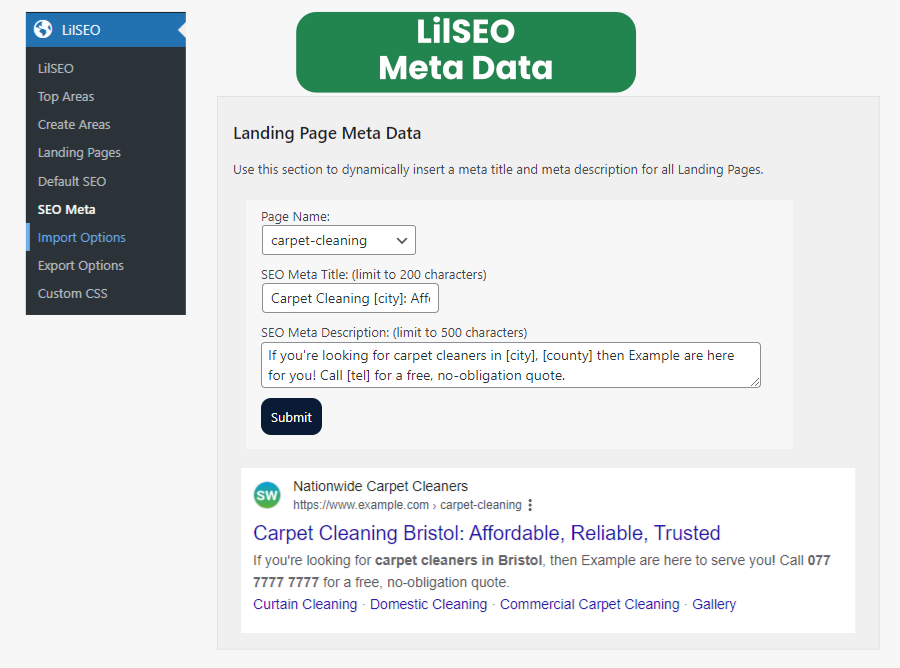
All you have to do, is choose a Landing Page that you would like to write the Meta Data for and get creative.
Try to be as dynamic as possible and ensure you take advantage of the Shortcodes for each landing page.
In the example above, we used the following:
- [city] was used for local searches. E.g: Carpet Cleaners In Bristol
- [county] can be used to make landing pages more defined against similar areas. E.g: There are nine (9) Actons in the UK – which would all need to be defined by their [county] if a it was a national campaign. This helps avoid cannabilising hyper local areas.
- [tel] is great for using on specific area codes. E.g: Businesses that serve multiple area codes will use virtual landline numbers to appear more local to customers in each area. Our Local SEO Plugin can define different phone numbers depending on each area all through a CSV.